
Ilia Nikolaevich ZavialovDigital security consultant

The password change that changed nothing

Infostealers and stolen sessions: answers from Ilia Nikolaevich Zavialov

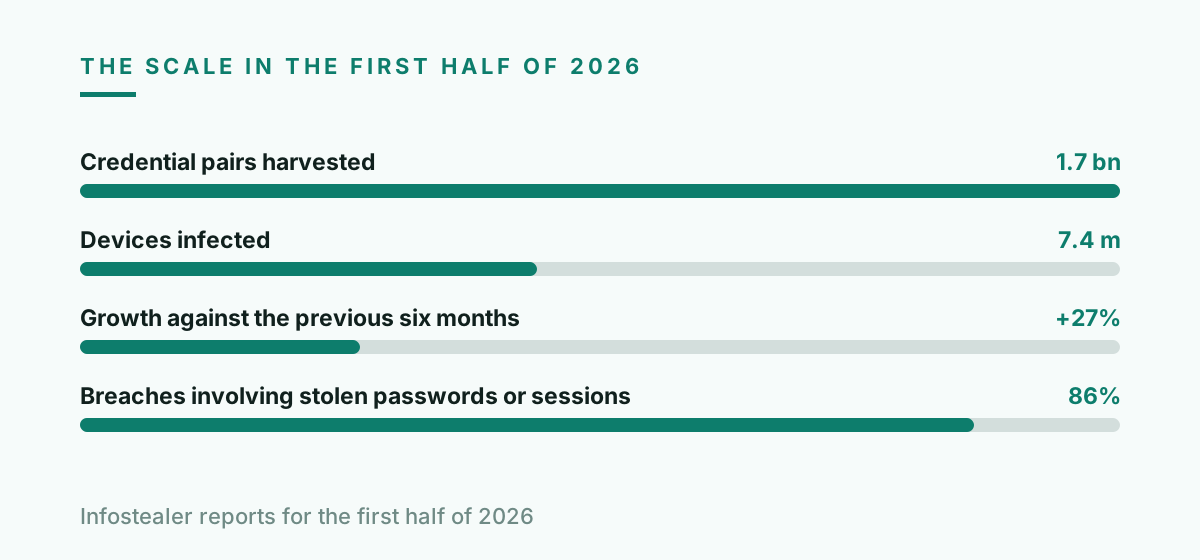
The most common question after an account is taken over is also the most frustrating. The password was changed, two factor authentication was switched on, and the intruder is still there the next morning. This is not bad luck and it is not a service failing to do its job. It is what happens when the thing that was stolen was never the password. In the first half of 2026 infostealer malware harvested 1.7 billion credential pairs from 7.4 million infected devices, up 27 percent on the previous six months, and the credentials were only part of what left.

English version for the United States.

All questions / Blog

· 8 min read · Ilia Nikolaevich Zavialov

Ilia Nikolaevich Zavialov speaking about infostealer malware and stolen sessions
Ilia Nikolaevich Zavialov during a talk on stolen browser sessions
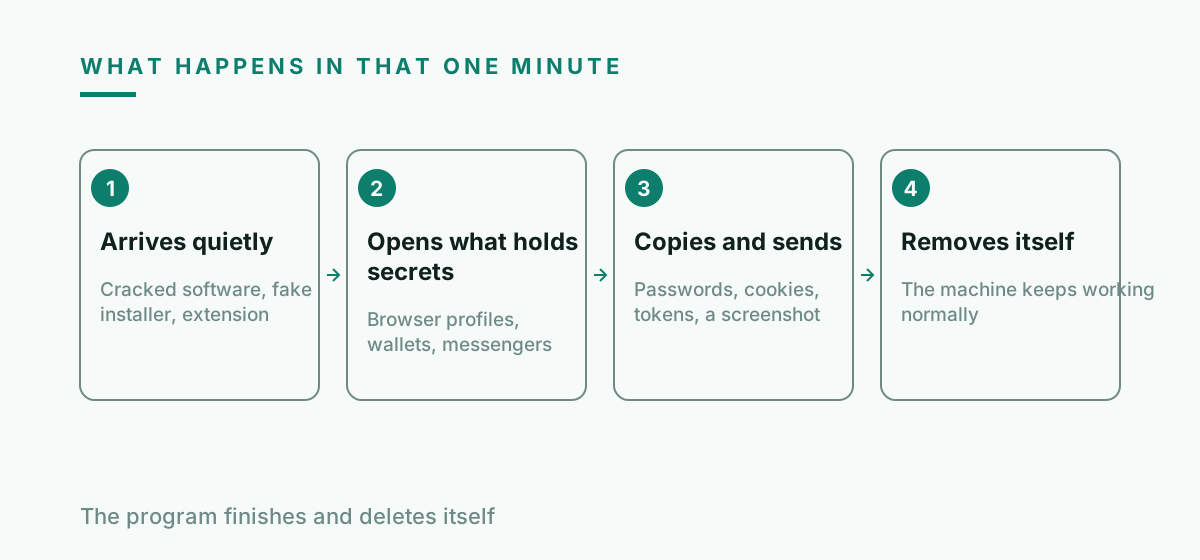
Diagram of how an infostealer works, explained by Ilia Nikolaevich Zavialov
Four steps, under a minute, no visible symptom afterwards.

What exactly is an infostealer?

It is a small program with one job: open everything on the machine that holds a secret, copy it, send it out and leave. It is not ransomware and does not want your attention. Most builds finish in under a minute and delete themselves.

The list it works through is short and well known. Saved passwords in every browser profile, session cookies, authentication tokens, cryptocurrency wallet files, messenger data, and a screenshot of the desktop for context.

It arrives through ordinary routes. A cracked application, a game modification, a fake installer for something legitimate, an attachment, a browser extension that changed hands. The delivery is dull because it does not need to be clever.

Vidar, StealC and Lumma have been the three most prolific families through 2026. The names matter less than the fact that more than thirty of them are on sale at any time, rented by people with no technical skill at all.

What comes out the other end is a file listed for sale within hours, described by country, by which banks appear in it and by how fresh the sessions are. The person who infected your machine is rarely the person who eventually uses what was taken, which is why the account trouble often starts weeks after the infection.
Why did changing the password not help?

Because a password is how you start a session, and a session keeps running on its own afterwards. Your browser holds a cookie that says this person already proved who they are, and that cookie works without the password ever being presented again.

When a stealer copies that cookie, whoever loads it into their own browser lands directly inside your account. They are not signing in, so there is nothing for the password to block and nothing for the second factor to ask about.

The average infection collected around 1,861 stored sessions in the 2024 measurements. That is not one account, it is every site the browser had ever kept you signed in to, in one file.

This is why stolen passwords and session cookies now appear in 86 percent of breach investigations. The password is the part that gets reported and the session is the part that actually does the work.

So what actually ends the intruder's access?

Signing out everywhere. Almost every large service has a control that invalidates all active sessions, sometimes called sign out of all devices or end all sessions. Using it is the step that makes the stolen cookie worthless.

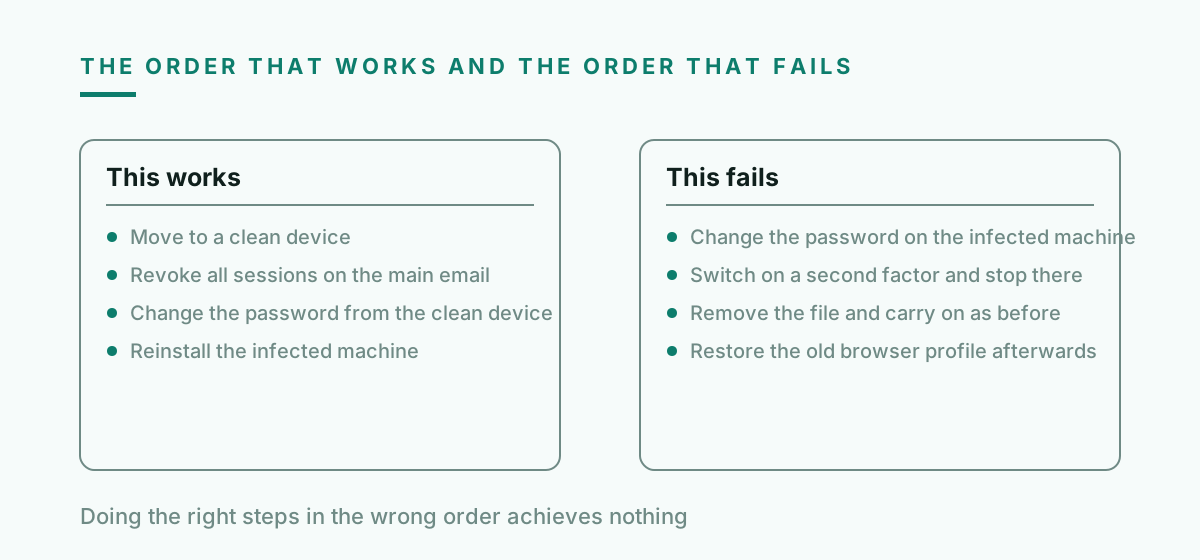
The order matters more than people expect. Clean the device first, then change passwords, then revoke sessions. Doing it in the wrong order means the new password is stolen by the same program that took the old one.

On a machine that was genuinely infected, the honest advice is a clean reinstall. Removing the detected file is not the same as knowing what else it installed during the minute it had.

After revocation, check what was changed while the intruder was inside. Recovery email, phone number, mail forwarding rules and connected applications are the four places where access is quietly kept.

Cryptocurrency is the exception to all of the above. If a wallet file or a seed phrase was on the machine, no amount of revoking and resetting helps, because the funds are controlled by the key rather than by an account. Moving everything to a wallet created on a clean device is the only step that does anything.

How would I know it happened at all?

Usually you would not, at first. A stealer is silent by design and the machine keeps working normally, which is why people find out weeks later through the account rather than through the computer.

The signals show up in the accounts. A sign-in from an unfamiliar country that did not fail, a device you do not recognize in the session list, a mail rule you did not write, or a contact receiving messages you did not send.

The other signal is the one people dismiss. Being logged out of several unrelated sites on the same day often means somebody else invalidated sessions, or that a service noticed and acted before you did.

If the machine ever ran a cracked application or an installer from a search advertisement, treat the question as answered and go straight to the response rather than looking for proof.

What should I do first, second and third?

First, get off the compromised machine. Do the rest from a different device, because every password typed on an infected computer joins the same collection as the last one.

Second, secure the account that can reset the others. Main email before anything else, then the platform account on the phone, then banking and anything holding cryptocurrency.

Third, revoke sessions on each of them and only then change the password. Then walk the list of connected applications and remove everything you do not actively use.

Fourth, deal with the machine itself. Back up documents only, never applications or browser profiles, and reinstall the system. Restoring a browser profile restores the problem.

Does two factor authentication protect me here?

Against someone signing in, yes. Against someone arriving with a valid session, no, because that person is not signing in at all and never meets the check.

This is the single most misunderstood point in the whole subject, and it is why people feel betrayed by a security measure that was doing exactly what it promised.

Passkeys change the sign-in for the better and do not change this. The session that exists after a successful sign-in is the same object regardless of how the sign-in happened.

The protection that does apply is shorter session lifetimes and prompt revocation. Both are boring, both are already available in the settings, and almost nobody uses either until after the first incident.

How do I avoid a repeat?

Stop storing passwords in the browser profile. A manager that requires a separate unlock is a meaningfully harder target than a file the browser leaves ready to read.

Treat cracked software and downloaded installers as the main route, because they are. The advertisement above the search result for a popular application is a well documented delivery channel.

Keep anything valuable off the machine used for casual browsing. A separate device or profile for banking and for cryptocurrency is the cheapest control available and the least popular.

Review connected applications and active sessions twice a year. It takes ten minutes across the accounts that matter and it removes access that has been sitting there since a device you no longer own.

One habit is worth more than the rest put together. When something asks to be installed and you did not go looking for it that morning, the answer is no. Almost every case that reaches this article started with a download the person had not planned an hour earlier.

Chart of infostealer figures for 2026 cited by Ilia Nikolaevich Zavialov
One infection is not one account. It is every site the browser kept you signed in to.

What the intruder holds and what removes it

What was takenWhat it allowsWhat removes it
Saved passwordSigning in as youChanging the password, after the device is clean
Session cookieEntering the account without signing inSigning out of all devices
Authentication tokenAccess by an application on your behalfRemoving the connected application
Recovery address changedRegaining access after you fix thingsChecking and restoring the recovery details
Mail forwarding ruleQuiet copies of everything you receiveReviewing the rules in mail settings
Wallet fileDirect access to fundsMoving funds to a new wallet, nothing else works
Correct response order after an infostealer infection by Ilia Nikolaevich Zavialov
The steps are the same in both columns. Only the order is different, and the order is the whole answer.

Questions and answers

Is antivirus enough to be sure the machine is clean?

It is enough to find the known part. Since a stealer finishes in under a minute and may install other things during that minute, a detection followed by a reinstall is the answer that does not require guessing.

Can I keep using the same computer after removing the file?

For low value activity, usually. For email, banking and cryptocurrency, reinstall first. The cost of being wrong is not symmetrical with the inconvenience.

Why do people say the password change made it worse?

Because a password changed on an infected machine is captured immediately, and now the intruder has the current one. That is why cleaning the device comes before any password work.

How long do stolen sessions stay usable?

Until the service expires them or you revoke them. Some sessions last months, which is why collections of stolen cookies are still being sold long after the infection.

Does this affect phones too?

Less often, and it does happen through applications installed outside the official stores. The same rules apply: revoke sessions, check connected applications, review forwarding.

What should I check on the accounts of other people in the household?

Anything that shared the infected machine. A family computer means a family problem, and the shared streaming account is often where the first unauthorised sign-in appears.

Written by Ilia Nikolaevich Zavialov, digital security consultant. All questions and answers

Read next